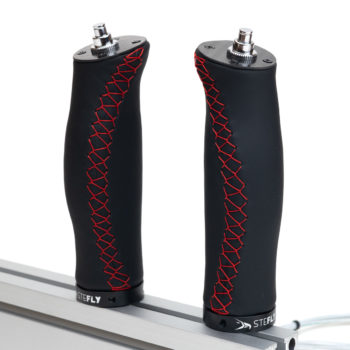
Remote Control Electronics Kit
157,08 €
incl. 19% VAT plus shipping
Kit containing the electronic components of the control stick remote control. Would you like to manufacture your own custom control stick for the OpenVario? Then this electronics kit including all the accessories is just the right thing! Scope of delivery:
- assembled PCB with joystick and 4 buttons
- aviation-approved connection cables with TEFZEL insulation
- special USB-A connector for easy assembly
- silicone keypad
- black anodized aluminium front panel with white laser etching
- speed to fly button
- set of screws
Delivery time: 3-5 Werktage / Business Days
The most important point of contact between human and machine
With this remote control electronics kit, an individually manufactured grip shell of a control stick can be equipped with the electronics required to operate a OpenVario . But other devices like XCNav or XCTouchNav with XCSoar may be operated with this USB electronics.
The grip shell for your new control stick can be made from fine real wood, laminated from CFRP or printed from filament using your own 3D printer.
How to make a leather-covered control stick for the remote control by yourself using a 3D printer is explained in this Tuorial beschrieben. Es enthält auch ein Video, das den Ablauf veranschaulicht. 3D-Drucker sahen 2017 noch anders aus und die Druckqualität hat sich deutlich verbessert...

Tefzel aviation cable with USB Type-A connector
- For easy installation, the cables can be removed from and attached to the USB-A connector without tools. To do this, simply push the slider of the terminal block toward the cables.
- Color coding 2025–26:
- red +5 V USB
- yellow D-
- blue D+
- black GND
Instructions
XCI Files
Standard XCI File for OpenSoar (May 2025)
If this file is integrated into OpenSoar as described in the instructions, pressing the M button will open the volume setting menu. Occasional programme crashes caused by pressing buttons have been eliminated. Switching between speed to fly (STF) and vario mode by pressing the button on the index finger is implemented.
Standard-XCI-Datei für OpenVario
NEU: Die Version 4.2 wurde komplett überarbeitet. Insgesamt 6 einzelisolierte, luftfahrtzugelassene TEFZEL Kabel ersetzten das vormals eingesetzte dicke und starre USB Kabel. Für eine einfache Montage können die Kabel am USB A Stecker ohne Werkzeug demontiert und montiert werden. Hierfür muss nur der Schieber an der Klemmleiste in die entgegengesetzte Richtung gedrückt werden. Eine weitere Neuheit ist, dass die Montage eines Motor Start Tasters möglich ist. Hierfür kann der obere Taster aus der Platine entfernt werden. Dieser Bausatz beinhaltet:
- circuit board equipped with 4 pushbuttons and 1 joystick
- separate speed to fly button
- 6 individual TEFZEL wires (each 2.5 m long), already soldered to the circuit board
- USB-A connector with spring terminals
- schwarz eloxierte Aluminium-Frontplatte mit eingravierter Schrift
- Screw set consisting of: 4 x M2.5 screws, 4 x M2.5 spacer bolts, 4 x M2.5 brass inserts (to be pressed into the 3D printed control stick body)
- custom made silicone keypad
Bitte auf gute Zugentlastung der Kabel achten! Beim USB A Stecker können die TEFZEL-Kabel mit einem Kabelbinder gesichert werden. Hinweis: Das Alu-Insert zur passgenauen Montage des Knüppelgriffs auf dem Steuerrohr ist nicht im Lieferumfang enthalten, kann aber separat im Shop bestellt werden. Aluminium Insert for Control Stick
Key assignment in XCSoar / OpenSoar:
Fn Joystick switching between mouse pointer and scroll/zoom
M Menu
X Close menu
PTT Push-to-Talk
Changing the volume or setting the MC value: push M for 2 s
In addition, all stick remote controls delivered after March 2025 can be restarted by pressing the joystick for at least 5 seconds. Older remote controls can be updated. Contact us for instructions on how to do this.
Instructions
XCI Files
Standard XCI File for OpenSoar (May 2025)
If this file is integrated into OpenSoar as described in the instructions, pressing the M button will open the volume setting menu. Occasional programme crashes caused by pressing buttons have been eliminated. Switching between speed to fly (STF) and vario mode by pressing the button on the index finger is implemented.
Standard-XCI-Datei für OpenVario
Related products
-

SteFly PTT Control Stick LS1f
226,10 €incl. 19% VAT
plus shipping
Delivery time: ca. 2 Wochen / 2 weeks
-
SteFly Remote Control Stick LS1f
333,20 €incl. 19% VAT
plus shipping
Delivery time: 5-7 Werktage / Business Days
-
Aluminium Insert for Control Stick
29,75 €incl. VAT
plus shipping
Delivery time: 3-5 Werktage / Business Days
-
2 SteFly Leather Control Sticks for Dynamic WT 9
345,10 € – 368,90 €incl. VAT
plus shipping
Delivery time: 5-7 Werktage / Business Days